
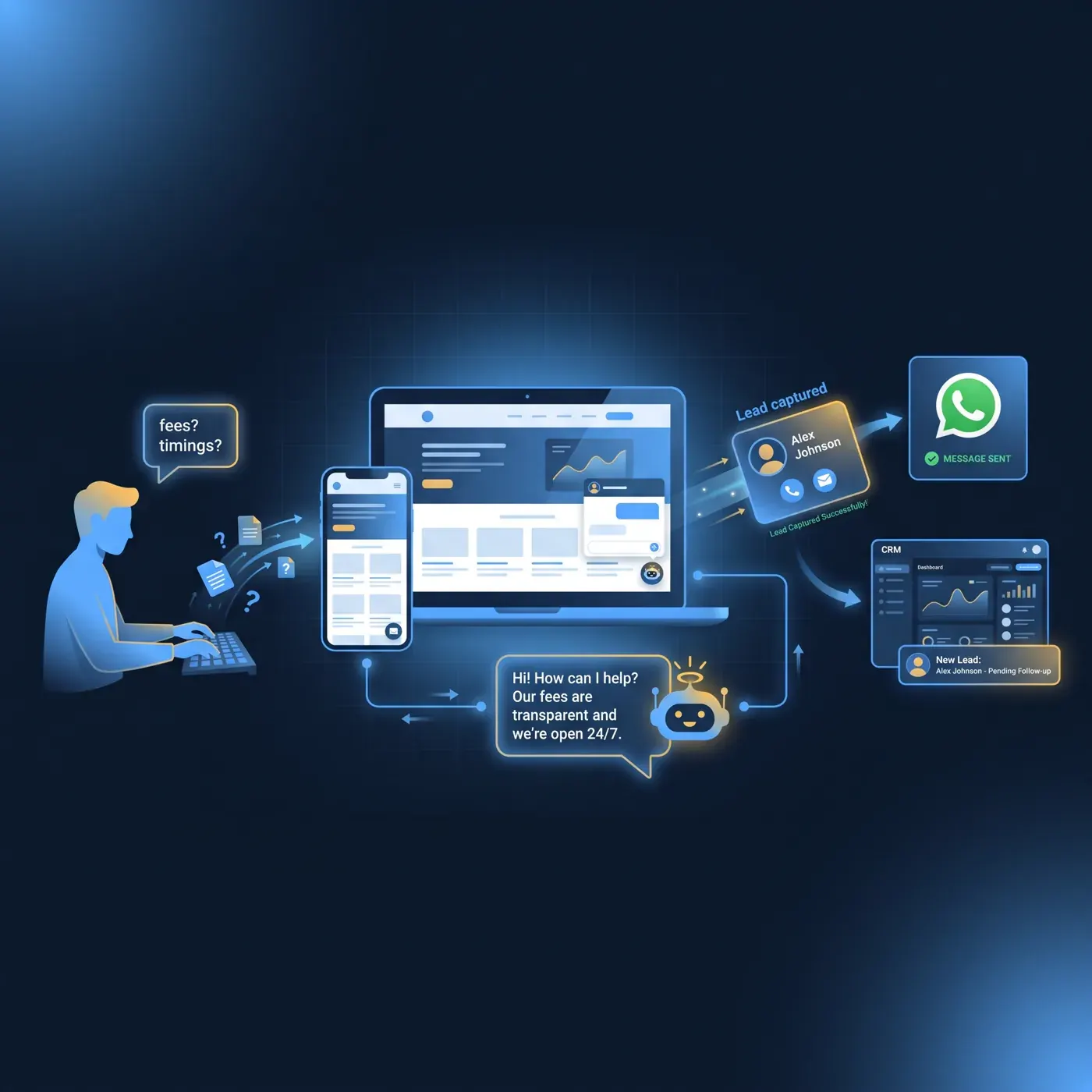
A chatbot is a software program that chats with people in a message window- on your website, WhatsApp or app- and answers their questions or collects their details automatically, without a human typing every reply. That's the whole chatbot meaning in one line: an assistant that talks. Some follow a fixed script; newer ones use AI to understand whatever a visitor types. For a small business in India, the practical version is simple- a visitor lands on your site at 10 p.m., the chatbot greets them, answers "what are your fees?", takes their name and number, and pings it to your WhatsApp before you've even seen the enquiry.
This guide covers what a chatbot is, the types, real examples, and how to add one- in plain terms, with no jargon.
What is a chatbot, exactly?
At its core, a chatbot is a program that holds a text conversation. You've used one already- the little chat bubble on a shopping site, the "Hi! How can I help?" box on a bank's page, the automated replies on a brand's WhatsApp. It reads what a person types and responds, either from a set of rules you've written or by using AI to work out what they mean.
The reason they're everywhere is speed. People now expect instant answers: Salesforce found that 83% of customers expect an immediate response when they contact a business, and Tidio reports that 62% of consumers would rather use a chatbot than wait for a human agent. A human can't sit on your website at 2 a.m.; a chatbot can. That gap is why the global chatbot market has grown from roughly US$9.6 billion in 2025 to a projected US$41.2 billion by 2033 (Grand View Research).
What is a website chatbot?
A website chatbot is simply a chatbot that lives on your website as a chat widget- the bubble in the bottom corner. Its main job for most small businesses isn't deep support; it's catching the visitor before they leave. Someone clicks your ad, reads your pricing page, hesitates, and closes the tab. A website chatbot steps into those few seconds: it starts a conversation, answers the one question holding them back, and saves their contact details so you can follow up.
If you want to add one, a free website chat widget like Skalix Free Chat drops onto your site with a single line of code and goes live in about five minutes- captured leads get pushed straight to your CRM, WhatsApp or Slack.
Rule-based vs AI: What is an AI chatbot?
There are two broad kinds, and the difference matters.
A rule-based chatbot follows a script you write. It asks set questions and offers buttons or fixed options- "Choose a service: 1) Haircut 2) Colour 3) Spa." It's fast, predictable, and never says anything off-brand, which makes it ideal for capturing leads and answering common questions.
An AI chatbot uses natural-language AI (the same kind behind tools like ChatGPT) to understand free-typed, messy questions- "do u do home delivery in Pune?"- and reply in its own words. It's more flexible, and it can usually handle Hindi and Hinglish, which matters in India. The trade-off is that it needs good information to stay accurate.
Neither is "better"; they solve different jobs. Many businesses start rule-based for reliable lead capture, then add AI for richer support.
Types of chatbots at a glance
- Rule-based: works from fixed scripts, buttons and set questions. Best for lead capture, FAQs and bookings. Example: a clinic chatbot that books appointment slots.
- AI chatbot: understands free-typed questions and replies in its own words. Best for support, detailed queries and Hindi/Hinglish. Example: a store bot answering "size available in blue?"
- Hybrid: a script for key steps, AI for open questions, and a human handover. Best for growing businesses that want both. Example: the bot qualifies the lead, then passes a hot one to you.
Chatbot examples: How small businesses actually use them
The clearest way to understand chatbots is to see them working. A few everyday chatbot examples from Indian small businesses:
- A coaching institute uses a website chatbot to answer "course fees?" and "next batch date?" instantly, and books a counselling call- so no enquiry is lost after office hours.
- A dental clinic lets patients pick a slot through the chat; the bot confirms on WhatsApp and cuts no-shows with a reminder.
- A D2C store answers "do you ship to my pincode?" and "COD available?" on the spot, which is often the only thing standing between a browser and a buyer.
- A real estate agent captures name, budget and locality from the chat, then follows up by phone- the same handoff we describe in our guide to turning website visitors into leads.
Notice the pattern: in every case the chatbot does the boring, repetitive first step so a human can do the valuable second one. For calls rather than chat, the same logic drives an AI voice agent.
Should your business add a chatbot? A quick checklist
Tick the ones that are true for you:
- ☐ You get website or ad traffic but few of them actually contact you.
- ☐ Enquiries come in after hours or on weekends, and you reply late.
- ☐ You answer the same 5–6 questions (price, timing, location) again and again.
- ☐ Your customers are comfortable on WhatsApp- most Indian buyers are; 50 million+ businesses now use WhatsApp Business (Meta).
- ☐ You'd rather your team spent time closing than copy-pasting replies.
Three or more ticks? A simple website chatbot will likely pay for itself quickly- and the basic version can cost ₹0 to start.
How to add a chatbot to your website
You don't need a developer. The steps are the same across tools: sign up, decide what the bot should ask and where leads should go, paste one line of code onto your site, and test it. With a no-code widget you can be live the same afternoon, on WordPress, Shopify, Wix or a custom site. Start with one clear job- usually "greet every visitor and capture their contact details"- and expand once it's working.
Frequently asked questions
What is a chatbot in simple words?
A chatbot is software that chats with people in a message window and answers their questions or collects their details automatically- no human needed for each reply. It can live on your website, WhatsApp or app, and it works 24/7.
What is the difference between a chatbot and an AI chatbot?
A regular (rule-based) chatbot follows a fixed script and offers set options, which makes it predictable and great for lead capture. An AI chatbot uses natural-language AI to understand free-typed, messy questions- including Hindi and Hinglish- and reply in its own words. Many businesses use rule-based for capture and AI for support.
Are chatbots free?
Some are. Several providers, including Skalix Free Chat, offer a free website chat widget with no credit card, so a small business can start capturing leads at ₹0 and upgrade only if it needs AI replies or higher volumes.
Can a chatbot talk in Hindi or regional languages?
Yes. AI chatbots can understand and reply in Hindi, Hinglish and several regional languages- which matters, since most Indian buyers prefer their own language. Rule-based bots can also be written in Hindi if you set the script that way.
Do chatbots actually increase leads?
They help most by closing the speed gap. Since 83% of customers expect an immediate response (Salesforce) and most won't wait, a chatbot that replies in seconds and saves the visitor's details captures enquiries you'd otherwise lose after hours- which is where the real gain for small businesses comes from.